
Looking for best study focus app? Here is a detailed Forest app review, known for procuring your focus during various tasks or studies.
Although smartphones have made our lives much easier today, they have also made staying focused on any specific task much harder. That’s where productivity apps come in to improve your focus.
Most of them use timers, Google Calendar, reminders, or to-do lists. They still heavily depend on your ability to stay focused. Forest app, however, takes a different approach: it gives you a virtual tree to protect instead of simply showing a normal timer on your mobile screen.
You plant a seedling, choose the time you want to focus, and keep the phone aside to protect your tree. Your tree may die if you leave the app during the focused session. You also build a virtual forest as you complete more sessions. This forest may help you showcase your ability to stay concentrated.
We’ll discuss everything about this app in this Forest App Review. You’ll learn about its core features, disadvantages, and advantages, etc. throughout this article.
Forest App Review: Quick Overview
| Features | Details |
| Platforms | iOS, Android, and web browser extensions |
| Main use | Focus and reduce digital̥ distraction |
| Focus session | Up to 120 minutes |
| Pomodoro support | Available |
| Games | Virtual tree, coins, and achievements |
| Statistics | Daily, weekly, monthly, and long-term tracking |
| Social | Friends, leaderboard, and shared sessions |
| Real-time planting | Via trees for the future |
| Browser extension | Yes |
| Who should use | Students, workers, and smartphone users |
Forest App Review: Top Features
1. Focus Timer
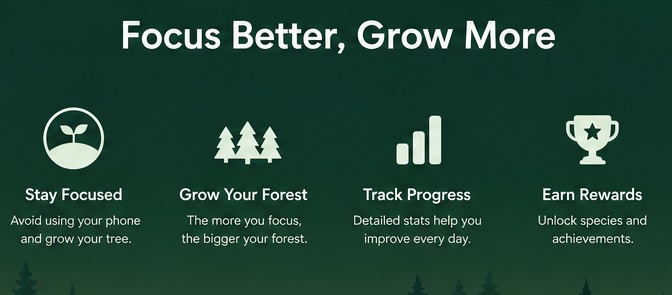
It is the heart of this app. Users can select a session duration from a few minutes to two hours. Its Pomodoro technique commonly uses 25 minutes of focused work followed by 5 minutes of breaks. It doesn’t force you to stick to the exact routine repeatedly. This is why you can keep your sessions short or long based on your needs.
Timer and Stopwatch modes are also available here. Although Timer mode is perfect when you know the exact duration, Stopwatch mode helps you count the minutes or hours you spend completing your work.
2. Virtual Forest and Gamification
It differentiates the forest app from other focused apps available today. Successful focus sessions help a user earn virtual coins and unlock extra tree species and content. The collection becomes a virtual record of your focused work over time.
This system makes productivity more rewarding. It gives you something to grow instead of just watching a timer on your screen.
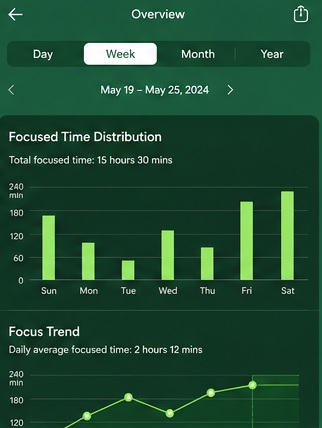
Forest also records focus activities by day, months, etc. It also lets you give a name to each focused session according to your needs. It is helpful to find out where that time was spent instead of just growing your tree’s collection.
Daily challenges, streaks, achievements, and leaderboards are among the reasons to open the app simultaneously and grow your tree daily.
4. Deep Focus Mode
It is a useful mode to resist the temptation of checking other apps on the user’s phone. It blocks certain apps unless they’re added to your allow list. Opening those apps would end the session and kill your tree.
It is indeed helpful when a fast notification check becomes a minutes-long scrolling session.
Social elements are also available. Friends can literally see each other’s trees and join shared focus sessions together.
6. Real Tree Planting
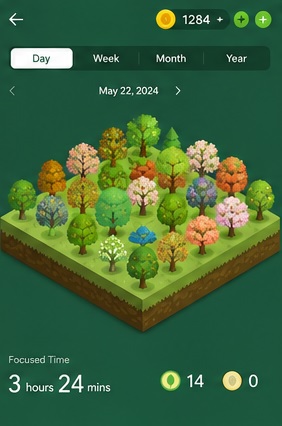
Forest also converts your digital productivity into real-world planting. Users can earn virtual coins through successful focus sessions and use them to plant real trees in the real world. Forest’s partnership with Trees for the Future helps you plant trees in the real world.
Every five contribution helps the planting of one real tree. It converts a digital tree into a meaningful goal towards the environment’s protection.
7. Browser Extension
Although Forest isn’t available on desktop devices, users can still use it as a browser extension. It lets users create focus sessions by blocking distracting websites. You can keep useful websites in the allowlist. The blocklist usually contains distracting websites like social media and streaming platforms.
Forest App Review: Pros And Cons
Forest App Pros
- Simple concept
- Attractive design
- Gamification makes sessions more engaging
- Pomodoro sessions and longer work blocks
- Track focused time
- Tags for different activities
- Shared sessions
- Real-time tree planting
- Browser extension
Forest App Cons
- Your willing to stay focused still matters
- Paid version needed to access advanced features
- Users can simply end your session and kill the tree
- Limited calendars and task-management tools
- Browser extension isn’t attractive compared to the mobile app
Forest still doesn’t end your desire to use the phone during the focus session. Your psychological resistance still plays an important role in this app.
Forest App Pricing
Although Forest’s core features are accessible for free, some advanced features still require a paid plan to access.
What You’ll Get With The Pro Plan:
- Exclusive + seasonal + early-access tree species & land styles
- All Mindful Space soundscapes
- Custom App Allowlist
- Time Guard with multiple apps/sites
- Focus Analytics + Custom Tags
- 3× coin boost
- VIP tier in seasonal events
- Plant real trees (up to 5 per account)
The exact pricing depends on the country where you reside. It would therefore be helpful to visit only the official Forest app to find out the exact price.
Who Should Use Forest App?
Forest is a good app for students to stay focused during homework, revision, or online classes. A small 25-minute tree would be enough for a small goal of growing a tree.
Remote workers or writers even enjoy it to get distracted from their phones during working hours. Work time and phone time would be divided with this simple focused session.
Language learners also use the Forest app to stay focused while practising their classes online.
FAQs to Forest App?
Is Forest free?
Yes, it is a freemium focus app where basic features are completely free to use. Forest Pro helps you access its advanced features.
Does Forest actually plant real trees?
Yes, its partnership with Trees for the Future lets you plant a real tree using earned coins.
Can you cheat Forest?
Yes, you must kill your tree to cheat it. It is only created for motivation.
Verdict on Focus App Review
It is a simple productivity app with an effective idea. It gives focus sessions a virtual reward, i.e., a tree. Forest is especially helpful for preventing phone distraction. It will not completely stop someone from using their phone. The punishment of killing a tree is enough to keep a person away from their phone.