
Looking for the best Notecard app? Suppose you want to create, organize, and review study cards. In that case, Anki deserves your attention for creating notecards easily. It combines active recall with spaced repetition in its app to schedule reviews around your memory.
Best Notecard App
Although it is available on desktop and mobile platforms, Ankiweb allows its users to sync their note card collection across devices. The official iPhone and iPad app is sold as a one-time purchase despite being free on Desktop and Android. Keep reading to know why Anki is my favorite Notecard app.
Best Notecard App: Anki
| Active recalls | Available |
| Spaced repetition | Strong |
| FSRS Scheduler | Yes |
| Custom decks | Yes |
| Shared decks | Available |
| Images & Audio | Yes |
| Desktop version | Yes |
| Android version | Available |
| iPhone or iPad | One-time purchase needed |
| Offline study | Available |
Anki- Best Notecard App features
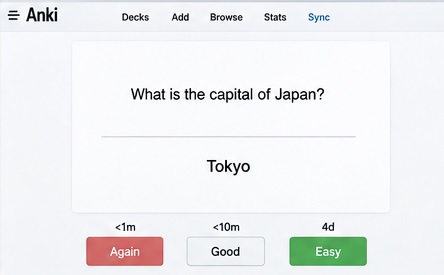
1. Spaced Repetition
Its review schedule deserves appreciation. Anki schedules cards based on your previous cards & review performance instead of showcasing every card repeatedly.
The current version also supports an alternative to the older SM-2 scheduler called FSRS. It helps schedule reviews accurately by predicting the time to forget your information. This is why Anki is perfect for memorizing topics for months instead of just one test.
2. Active Recall
Anki uses a simple question-and-answer format. You first here see the question, remember the answer, and tap on reveal to know if you’ve remembered the correct answer. It also asks you to rate your memory performance after revealing the answer. This helps it to decide when the card should come again.
3. Flexible Cards
Anki also gives you more control over other notecard apps available today. You can create different types of notes here, use different card types, & add tags. It also allows you to add media like audio & video to the card.
Users can also use the single note to create several note cards simultaneously. This is useful to test yourself with the same information in different ways.
There’s no need to create everything yourself here because Anki supports shared decks created and uploaded by other users. It allows you to download shared decks, import them, and synchorize it with other devices. It is also important to understand the subject instead of completely depending on others’ sets.
5. AnkiWeb Sync
AnkiWeb is especially ideal for keeping your collection synchronized between supported devices. It helps you to study on your computer & continue on another device without moving your complete card collection.
The best thing about this service is that it is completely free. It is perfect for studying online anywhere & on any device.
6. Custom Study Options
Learners sometimes need to study something outside their busy schedule. This is why Anki offers filtered decks and custom study options for different situations. It is mainly useful for exam revision, reviewing particular tags, catching up on cards, or studying cards before their scheduled date.
Pros & Cons of Anki Notecard App
| Anki’s strengths | Anki’s weakness |
| Powerful spaced repetition | One-time subscription for iOS |
| FSRS Support | Complicated interface for beginners |
| Strong active recall | Learning may be needed to create advanced cards |
| Very customizable cards | |
| Shared decks are available |
Read Also,
Is AnkiDroid Safe? Expert Review
AnkiDroid: How to use AnkiDroid? Step by Step Guide
Anki Notecard App Pricing
Anki’s desktop version is free & open source. It also offers free synchronization through AnkiWeb. Android users can also use it for free through AnkiDroid.
They run a donation program where you can donate as per your wish and capacity to help maintain their expenses.
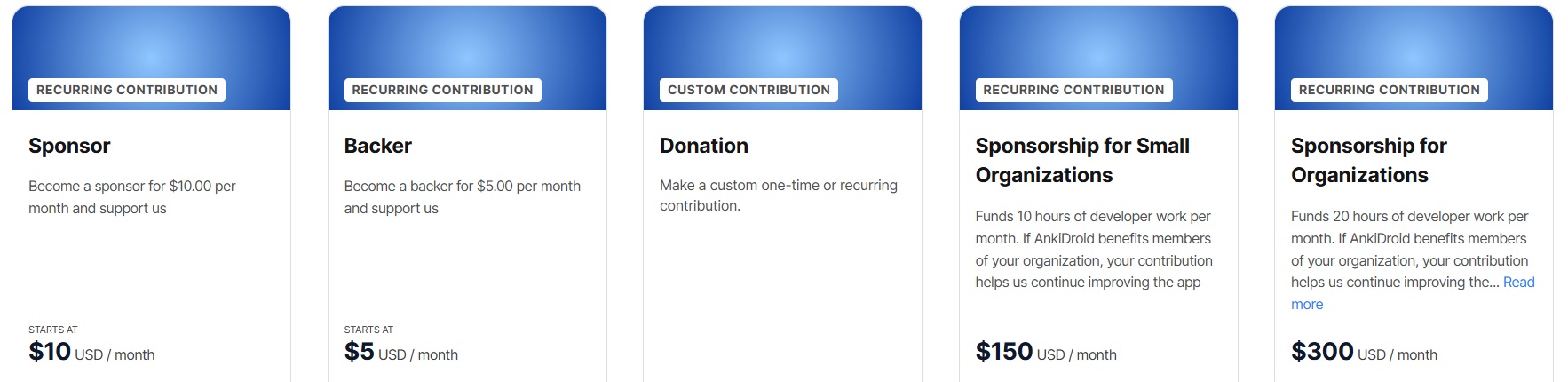
The Anki Mobile app for iPhone and iPad is currently listed at $24.99 in the US App Store as a one-time purchase instead of a monthly subscription. It supports Anki’s development & its mobile version.
Who Should Use This Best Notecard App?
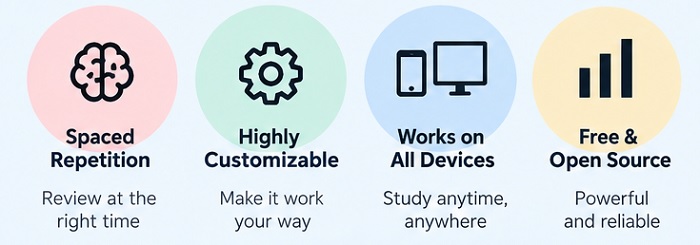
Students getting ready for exams, language learners, and medical students should use it. Anki is also perfect for professionals studying for certifications. Anyone can also use it for remembering the large set of information.
It is especially useful for learners looking for a long-term study system instead of a random place to store their notes.
Although students can use it to create separate decks, language learners can create cards for vocabulary, grammar, sentences, and pronunciation. You can also organize the deck system into broad categories and subdecks.
FAQs to Best Notecard App
Is Anki the best notecard app?
Yes, it lets you create digital cards with questions and answers. Users can also organize them into decks and review them using a scheduling system.
Is Anki free?
Yes, the desktop version, Ankidroid, and AnkiWeb are completely free to use. AnkiMobile, however, asks for a one-time subscription on the iPhone and iPad versions.
Does Anki use spaced repetition?
Yes, the platform uses a review schedule to decide the approximate time of returning the card. Its current version also uses the FSRS feature for accurate scheduling.
Can I use Anki on multiple devices?
Yes, AnkiWeb allows you to synchronize your collection between supported devices like your desktop or mobile device.
Can I download premade Anki decks?
Yes, shared decks are available here. They can be downloaded and imported.
Final Verdict
Anki is among the best notecard apps for doing more than just keeping your study notes. It is ideal for serious learners because Anki offers the combination of active recall, spaced repetition, customizable card types, shared decks, media support, and cross-device synchronization.
It indeed has a learning curve for creating advanced cards. Anki can still become a powerful tool for your daily study routine after understanding its basic feature. It is therefore the best notecard app for long-term memorization.